Investigation. Risk. Operational assurance.

Understand the causes.
Control the change.
Verify the result.

Connect incident reporting and root cause analysis with bowtie risk assessment, change control, compliance reviews, audits, observations and competence. Keep the evidence, decisions and actions together.

No sign-up for the demonstration · Fictional, read-only records

ONE CASE. A CONNECTED RESPONSE.ILLUSTRATIVE WORKSPACE
Northbank EngineeringDEMONSTRATION COMPANY

IR-026 · Dispatch bay near miss

Capture the facts.
Start the right response.

No injury. Serious potential. A route change needs investigation.

TRIAGE COMPLETE · INVESTIGATION LINKED
Forklift and pedestrian paths converged.
Report IR-026→Review→INV-026
From first report to verified improvement

Follow the same story through the complete demonstration.

Sentinel Incident

Capture, triage and assign the response.

Sentinel Investigate

Understand what happened, and why.

Sentinel Investigate Pro

Test causes. Strengthen the investigation.

Sentinel Bowtie

See the pathways. Strengthen the barriers.

Sentinel Assure

Verify performance. Review effectiveness.

Introducing Sentinel Incident

A clear first report.
A better next decision.

Capture near misses, injuries and illnesses, spills, property damage and vehicle incidents. Record what happened before deciding why.

Near missesInjuries & illnessesSpillsProperty damageVehicle incidents

Every report has a next step.

Record actual and potential impact, immediate response, a review owner and a due date. Link the report to an existing investigation or start a new one after triage.

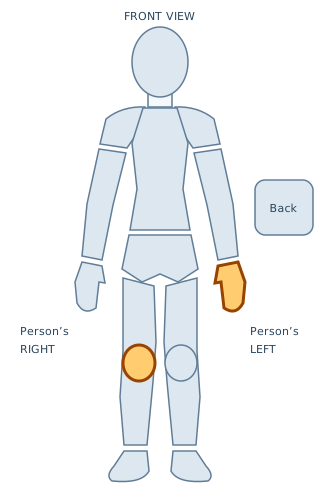
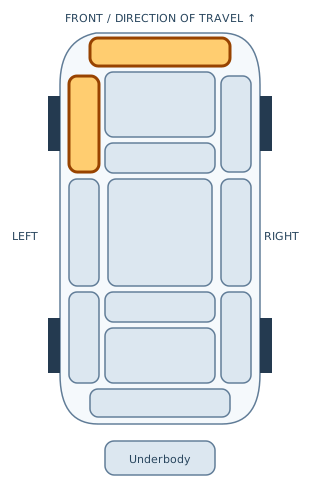
  • Multi-select body and vehicle diagrams with labelled controls
  • Factual accounts, locations, categories and review status
  • Named action owners and independent verification
  • Closure review linked to investigation and action outcomes
Body location example: left hand and right knee highlighted
Locate affected body areas
Vehicle location example: front bumper and left front quarter highlighted
Record vehicle contact areas

Separate fictional map exercise. Select more than one area in the working suite. These markers record location, not a diagnosis or damage assessment.

The expanded Sentinel suite

Control the change.
Keep the evidence.

Five additional product choices extend the work beyond investigation. Audits are also part of Assure, connecting findings, corrective actions and effectiveness reviews.

Sentinel Change

Approve the change before exposure

Review operational changes, affected barriers, readiness and temporary-change expiry. Retain a named owner, independent decision and post-implementation review.

Explore Change →Read the Change guide ↗

Sentinel Audit

Test what happens in practice

Plan audits, reuse approved checklists, sample evidence and record findings. Link actions and management reviews. These capabilities are also included within Assure.

Explore Audit →Read the Audit guide ↗

Sentinel Observe

Make early concerns visible

Capture hazards, positive control observations and improvement suggestions. Record the response, triage potential harm and propose linked changes.

Explore Observe →Read the Observe guide ↗

Sentinel Competence

Authorise against demonstrated ability

Define task requirements, retain training and practical assessment evidence, and record scoped authorisations with restrictions and validity dates.

Explore Competence →Read the Competence guide ↗
One company assessment. Connected records.

Link the observation to a change, the change to affected barriers, and audit findings to actions. Named people review decisions. Evidence uploads stay with the record they support.

Follow the extended Northbank example →

The Safetyman Sentinel Suite

Choose the tools.
Connect the work.

Begin with a report or a risk assessment. Choose the depth of investigation you need, then carry supported findings into stronger barriers and continuing assurance.

01 / Understand

Go beyond the first explanation.

Build a clear account of an event. Test explanations against evidence, branch where causes interact, and turn supported findings into corrective actions.

  • Guided 5 Whys and branching Why Trees
  • Timelines, evidence and original Sentinel frameworks
  • Reviewed findings, linked actions and bowtie transfers
Explore Investigate
INV-026 / CAUSAL REVIEWFictional example
1
Pedestrian entered the vehicle routeSupported by the fictional event record
2
A temporary route bypassed the gateLinked evidence · E-02
3
The layout change missed control reviewReviewed finding · F-03

A supported cause, a traceable source, a defined next action.

SENTINEL INVESTIGATE PRO

Go deeper.
Keep the evidence connected.

Extend 5 Whys and Why Trees into a structured, evidence-led investigation. Arrange causes on an interactive canvas, inspect linked evidence, compare solution options and check investigation completeness. Review recurring themes across your authorised investigations.

ONE CASE · SIX STAGES
  1. DefineScope, team and review arrangements
  2. PreserveSources, timeline and limitations
  3. TestSupporting and contradicting evidence
  4. ExplainCausal connections and factor reviews
  5. ActMeasurable success and residual risk
  6. ReviewIndependent judgement and continuing assurance

Explain, with evidence.

Distinguish supported findings, hypotheses, refuted explanations and unanswered questions. Readiness checks expose gaps before review.

Choose the depth you need.

Pro extends Investigate. Purchase it with Investigate or combine it with Bowtie and Assure under one annual company subscription.

Carry learning into operations.

Propose supported findings to Bowtie through a reviewed transfer, then verify controls and action effectiveness in Assure.

Original Safetyman framework. Company evaluation is the next step; no third-party methodology certification or validated accident prediction is implied.

The work stays connected

Learning should change
what happens next.

Each module answers a different question. Linked records retain the source account, evidence and review decisions; people decide what moves forward.

01 / INCIDENT

Capture and triage.

Record facts, actual and potential impact, immediate response and a review owner.

Report → linked investigation
02 / INVESTIGATE

Establish what failed.

Review the timeline, test causes and connect each supported finding to its evidence.

Finding → reviewed bowtie transfer
03 / INVESTIGATE PRO

Test the explanations.

Challenge hypotheses and compare expected with observed barrier performance.

Supported findings → reviewed transfer
04 / BOWTIE

Strengthen the barriers.

Map threats, consequences and controls. Show how degradation can weaken each barrier.

Barrier → performance standard
05 / ASSURE

Check that it works.

Record inspections, review actions and assess whether the changes achieved their intended effect.

Verification → continuing review

A transfer keeps its source and review history. It is a deliberate review step, so an investigation finding is not silently treated as an approved barrier.

See the whole story

Walk into an example.
Follow it all the way through.

Meet Northbank Engineering. Start with a fictional forklift near-miss report, follow the investigation and barrier-failure review, then inspect the controls and effectiveness evidence.

Demonstration case / NB-026

A changed route.
A missed review.
A preventable exposure.

No injury was recorded in this fictional near miss. What needs to change before the next vehicle movement?

01
Evidence to supported causes5 Whys · Why Tree · event timeline
02
Causes to stronger controlsThreats · barriers · degradation
03
Controls to verificationStandards · inspections · effectiveness

Built around the working team

Context at every step.
Accountability throughout.

Keep evidence, responsibilities and review decisions close to the work they support.

Private company workspaces

Company membership and workspace roles control who can view, contribute and review. Records and reporting stay within their company boundary.

Trusted platform administrators manage the service.

Collaborative review

Work on shared records, see colleague presence and resolve overlapping changes. Review decisions retain their context in the change history.

Actions with a purpose

Connect an action to the finding or control it addresses. Record an owner and due date, then review the outcome after completion.

Optional AI assistance

Use configured AI to help draft and examine selected material. People review the output and remain responsible for the assessment.

Requires server configuration and deliberate data selection.

Connected monitoring

Bring in configured sensor readings and inspect freshness, quality and thresholds. Choose authorised recipients for operational email alerts.

Gateway, SMTP and scheduler setup are required.

Forecasting with evidence

Collect dated observations, assess data readiness and inspect backtesting. Estimates remain withheld until the data requirements are met.

A new launch has no pre-validated incident forecast.

An annual plan that fits your team

Start focused.
Grow together.

Choose the products your team needs, from incident reporting to operational assurance. Audit is available separately and is included within Assure. Annual licences allocate named users in blocks of ten; Pro extends Investigate.

Available product packages
ProductBest starting point
IncidentReports, triage, injury and vehicle locations
Investigate5 Whys, Why Trees, evidence and timelines
Investigate ProEvidence tests, causal maps and Barrier Failure Analysis
BowtieThreats, consequences, barriers and degradation controls
AssureControl verification, audits, findings and effectiveness reviews
Complete SuiteCore and operational modules in one company workspace
EnterpriseDiscuss larger teams and rollout requirements
ChangeApprove the change before exposure
ComplianceShow the requirement and the evidence
AuditTest what happens in practice · also included in Assure
ObserveMake early concerns visible
CompetenceAuthorise against demonstrated ability

Pricing is by quotation. This planner estimates seat allocation, not a subscription charge. Product availability is configured for your service.

Plan your team’s access

One named user. One seat across their workspaces.

30named seats
10 seats200 seats
3 blocks of 10 seats · annual licenceIncident, Investigate, Investigate Pro, Bowtie and Assure, connected.
Discuss this plan

More than 200 seats? Choose Enterprise and tell us your requirements. No payment is taken here.

Clear answers

How does the expanded suite work?

Does Assure now include audits?

Yes. Assure includes audit planning, reusable templates, checklists, findings, management reviews and linked corrective actions. Audit is also available as a separate product choice.

Can we upload supporting evidence?

Yes. New module records support PDFs, Word, Apple Pages and supported images using an upload button or drag and drop. Export Google Docs to Word or PDF first. Limits are 5 MB per file and 100 files or 50 MB per assessment.

Does Compliance certify our organisation?

No. It records requirements, applicability, evidence and reviewed conclusions. Your organisation maintains the sources and makes the compliance judgement; there is no automatic legal update feed or certification.

Can we follow the entire process before buying?

Use the fictional Northbank demonstration. Explore the incident, causes, barriers, observation, change proposal, requirement review, competence assessment and audit finding. No sign-in is required.

Read the new module guidance →

Learn with confidence

A clearer start for every user.

Visit the learning centre
NEW

Incident and BFA guidance

Report, triage, select affected areas, review failed barriers and allocate actions through to effectiveness review.

Open the step-by-step guide →

The complete training guide

Practical core-suite guidance, supported by the new Incident and BFA guide. Read online or keep the handbook for offline reference.

Download the handbook

Learn by following one case

Explore a cause, follow its bowtie connection and inspect the verification evidence. No client records required.

Start the guided demonstration

Before you start

A few useful
answers.

What is Sentinel Incident?

Sentinel Incident is the reporting and triage module of the Safetyman Sentinel Suite. Authorised users capture incidents and near misses within an assessment, record actual and potential impact, assign a review owner and link the report to an investigation.

How do the modules connect?

Incident captures the event. Investigate develops the evidence and timeline. Investigate Pro tests explanations and reviews barrier performance. Reviewed findings inform Bowtie controls. Assure checks those controls and whether actions remain effective.

Who owns an action?

Record the responsible organisation and allocate a named authorised company user, with a different verifier. Allocation does not grant access. Complete managed-action closure requires verification and an effective outcome review in Assure.

Can we start with just one product?

Yes. Sentinel Investigate and Sentinel Bowtie can be supplied independently. The complete Suite connects them with Sentinel Assure for continuing control verification. Contact Safetyman to agree the modules and annual licence for your service.

How does an investigation become a bowtie?

A reviewer selects supported findings and maps them to the appropriate bowtie records. Source snapshots and transfer decisions are retained. The target bowtie can then be extended collaboratively. The public demonstration shows an illustrative completed transfer; it does not submit a live one.

Can separate clients keep their records private?

The company model separates client membership, workspaces and reporting. Workspace roles add permissions within each company. Trusted platform administrators manage the service and can access company workspaces; they are not ordinary client seats.

Are the demonstration records real?

No. Northbank Engineering, its people, evidence, dates and results are fictional. The example is read-only, sends no email alerts, accepts no sensor feeds and never connects to client records. It is available without a client account when deployed on your public website.

Does forecasting work on day one?

A new company starts with data collection. Dated observations and actual outcomes must accumulate before estimates can pass the documented data and evaluation gates. The example does not present invented forecast accuracy or claim a validated accident predictor.

How do annual seats work?

Seats are named-user allocations in blocks of ten. Reviewers and viewers also use seats, while additional workspaces do not use extra seats. Prices and annual renewal terms are agreed separately; this website does not charge a card.

Your next step

Bring the whole
process together.

Tell Safetyman what your team needs. We can discuss the right starting product, seat allocation and rollout requirements.

sentinel@safetyman.net

This prepares a draft in your email application. Nothing is submitted or stored by this form.